Showing posts with label SQL Server. Show all posts

2017-05-06

Create SSIS Package in Code Part 3 - BIML

This is the 3rd, and the last post of the topic "Create SSIS package in Code". The other two posts about this topic can be found via the links below:

So today's topic is creating SSIS package via BIML. BIML, stands for Business Intelligence Markup Language,  is an extremely powerful tool can help you prepare and standardize your ETL project. Just in case you haven't heard of it, you can find everything about BIML at BIMLScript site. Just like previous two posts, I am going to demonstrate how easily we can create identical package (a Data Flow Task, flat file connection, and OLE DB connection) in BIML today.

Creating BIML for SSIS package is a bit different to our previous projects, in which we did C# code in a C# console program. To create a BIML file, we do our task in Visual Studio Business Intelligence project.

So first of first, we need to have BIMLExpress installed in our development environment. Then in your Visual Studio IDE you should be able to add BIML file into your project via the menu item:


Alternatively, you can add a BIML file into the project through the context menu.


After we have BIML file added into the project, we can start to write BIML components. To save your time, here is what I wrote:

<biml xmlns="http://schemas.varigence.com/biml.xsd">
    
    <connections>
        <flatfileconnection fileformat="myBIMLFlatFileFormat" filepath="D:\test\test.txt" name="myBIMLFltCon"></flatfileconnection>
        <oledbconnection connectionstring="Data Source=CHI\SS2016;Initial Catalog=Staging;Provider=SQLNCLI11.1;Integrated Security=SSPI" name="myBIMLOleCon"></oledbconnection> 
    </connections>
        
    <fileformats>
        <flatfileformat codepage="1252" columnnamesinfirstdatarow="true" flatfiletype="Delimited" headerrowdelimiter="|" isunicode="false" name="myBIMLFlatFileFormat" textqualifer="None">
            <columns>
                <column columntype="Delimited" datatype="AnsiString" delimiter="|" length="255" name="FirstName"></column>
                <column columntype="Delimited" datatype="AnsiString" delimiter="|" length="255" name="LastName"></column>
                <column columntype="Delimited" datatype="AnsiString" delimiter="|" length="100" name="Suburb"></column>
                <column columntype="Delimited" datatype="AnsiString" delimiter="|" length="3" name="State"></column>
                <column columntype="Delimited" datatype="AnsiString" delimiter="CRLF" length="4" name="Postcode"></column>
            </columns>
            
        </flatfileformat>
    </fileformats>
        
    <databases>
        <database connectionname="myBIMLOleCon" name="BIMLStaging"></database>
    </databases>
    
    <schemas>
        <schema databasename="BIMLStaging" name="BIMLSchema"></schema>
    </schemas>
    
    <tables>
        <columns>
                <column datatype="AnsiString" length="255" name="FirstName"></column>
                <column datatype="AnsiString" length="255" name="LastName"></column>
                <column datatype="AnsiString" length="100" name="Suburb"></column>
                <column datatype="AnsiString" length="3" name="State"></column>
                <column datatype="AnsiString" length="4" name="Postcode"></column>
            </columns><table name="customer" schemaname="BIMLStaging.BIMLSchema">
            
        </table>
</tables>
        
    
    <packages>
        <package name="myBIMLPackage" protectionlevel="EncryptSensitiveWithUserKey">
            <tasks>
                <dataflow name="myBIMLDFT">
                    <transformations>
                        <flatfilesource connectionname="myBIMLFltCon" name="myBIMLFltSrc"></flatfilesource>
                        <oledbdestination connectionname="myBIMLOleCon" name="myBIMLOLEDest">
                            <inputpath outputpathname="myBIMLFltSrc.Output"></inputpath>
                            <externaltableoutput table="customer"></externaltableoutput>
                        </oledbdestination>     
                    </transformations>
                </dataflow>
            </tasks>
        </package>
    </packages>
    
</biml>


Once we complete the coding task, we can simply right click the BIML file, and then press "Generate SSIS Package".


Now a new package is generated in our Business Intelligence project (myBIMLPackage). Open the package and run the package, we got the execution result right away.


Obviously, BIML is much simpler than other approaches. It hides the complicated mapping routines for you when you are designing your package. Within the Business Intelligence project, you can add BIML script file as a standard template and then generate packages in one batch. Additionally, BIML express provides quite a lot handy functions to improve your productivity, such as BIML script validation. So I strongly recommend this approach when you are working in ETL project.


Here is the end of the series "Create SSIS package in Code". Before my next post, enjoy it. :)


2017-04-24

Create SSIS Package in Code Part 2 - EzAPI

This is the 2nd post of the topic "Create SSIS package in Code". The full list of the posts about this topic can be found via the links below:
Today let's look at the option of EzAPI. Basically EzAPI is a set of classes designed to simplify and automate the process of creating SSIS packages. You can find its details and documentations at CodePlex, or just in case at the time you read this post CodePlex has been shut down, you can find it on the nuget.

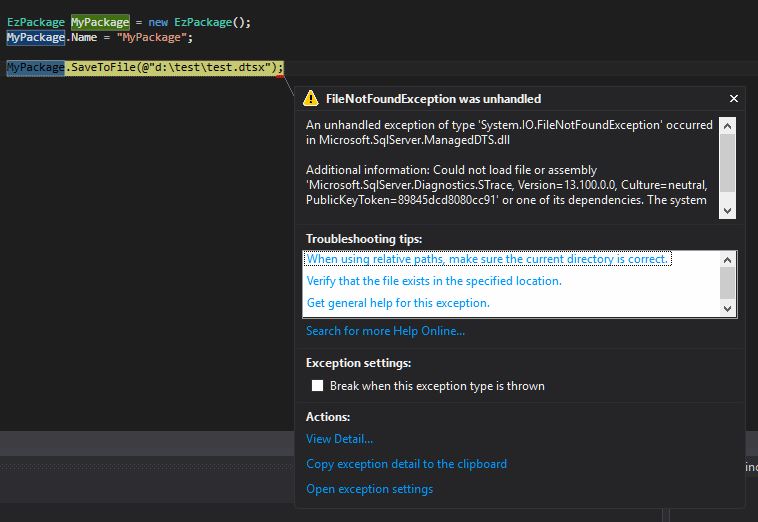
Before I show you the steps of creating a package via EzAPI, you may or may not face this error when you try to save the package:  

An unhandled exception of type 'System.IO.FileNotFoundException' occurred in Microsoft.SqlServer.ManagedDTS.dll

Additional information: Could not load file or assembly 'Microsoft.SqlServer.Diagnostics.STrace, Version=13.100.0.0, Culture=neutral, PublicKeyToken=(your machine based value)' or one of its dependencies. The system cannot find the file specified.


To my understanding it is a reference error, that when the API tries to call its dependency, it cannot find the correct path. To fix the problem, we can manually add the reference. In my case, I move to the system folder "C:\Windows\assembly", search and find correct STrace.dll location (version 13.100.0.0), and then add it into the project reference.


Now if we call the SaveToFile method again, the error has gone.


OK, it is time for the EzAPI. Generally, creating package via EzAPI is much simpler than the pure C# way. Because many SSIS objects have been wrapped and simplified in EzAPI. Below code did the identical thing to my first example: import some records from a flat file into database table, but in a relatively simple way.


        static void Main(string[] args)
        {

            string fltFilePath = @"d:\test\test.txt";
            string pkgPath = @"d:\test\myEzAPIPackage.dtsx";

            EzPackage MyPackage = new EzPackage();
            MyPackage.Name = "myEzAPIPackage";

            //flat file connection manager
            EzFlatFileCM fltFileCM = new EzFlatFileCM(MyPackage);
            fltFileCM.ConnectionString = fltFilePath;
            fltFileCM.ColumnNamesInFirstDataRow = true;

            //similar to the pure C# example
            //we hard code column metadata
            #region columns
            IDTSConnectionManagerFlatFileColumn100 colFirstName = fltFileCM.Columns.Add();
            colFirstName.ColumnType = "Delimited";
            colFirstName.ColumnDelimiter = "|";
            colFirstName.DataType = DataType.DT_STR;
            colFirstName.ColumnWidth = 255;
            ((IDTSName100)colFirstName).Name = "FirstName";


            IDTSConnectionManagerFlatFileColumn100 colLastName = fltFileCM.Columns.Add();
            colLastName.ColumnType = "Delimited";
            colLastName.ColumnDelimiter = "|";
            colLastName.DataType = DataType.DT_STR;
            colLastName.ColumnWidth = 255;
            ((IDTSName100)colLastName).Name = "LastName";

            IDTSConnectionManagerFlatFileColumn100 colSuburb = fltFileCM.Columns.Add();
            colSuburb.ColumnType = "Delimited";
            colSuburb.ColumnDelimiter = "|";
            colSuburb.DataType = DataType.DT_STR;
            colSuburb.ColumnWidth = 100;
            ((IDTSName100)colSuburb).Name = "Suburb";

            IDTSConnectionManagerFlatFileColumn100 colState = fltFileCM.Columns.Add();
            colState.ColumnType = "Delimited";
            colState.ColumnDelimiter = "|";
            colState.DataType = DataType.DT_STR;
            colState.ColumnWidth = 3;
            ((IDTSName100)colState).Name = "State";


            IDTSConnectionManagerFlatFileColumn100 colPostcode = fltFileCM.Columns.Add();
            colPostcode.ColumnType = "Delimited";
            colPostcode.ColumnDelimiter = Environment.NewLine; //this is the last column, so the delimiter needs to be set as new line
            colPostcode.DataType = DataType.DT_STR;
            colPostcode.ColumnWidth = 4;
            ((IDTSName100)colPostcode).Name = "Postcode";

            #endregion

            //ole db connection manager
            EzOleDbConnectionManager oleDBCM = new EzOleDbConnectionManager(MyPackage);
            oleDBCM.ConnectionString = "Data Source = CHI\\SS2016;Provider=SQLNCLI11.1;Initial Catalog = Staging;Integrated Security = SSPI;";
            oleDBCM.Name = "my OLE Connection Manager";

            //data flow task
            EzDataFlow dft = new EzDataFlow(MyPackage);
            dft.Name = "dft EzAPI";

            EzFlatFileSource fltSrc = new EzFlatFileSource(dft);
            fltSrc.Connection = fltFileCM;
            fltSrc.ReinitializeMetaData();

            EzOleDbDestination oleDest = new EzOleDbDestination(dft);
            oleDest.Connection = oleDBCM;
            oleDest.AttachTo(fltSrc);
            oleDest.Table = "Customer";
            

            MyPackage.SaveToFile(pkgPath);

            Console.WriteLine("created successfully");
            Console.ReadLine();

        }


From this code list, we can see EzAPI simplifies the pipeline management, so that we do not need to spend time on adapter coding. However, for the connection managers we still need to define their metadata, and especially when we need to assign flat file source into the data flow task, we need to refresh the metadata by calling ReinitializeMetadata() method.

Now run the program by press F5, the myEzAPIPackage should be generated in your D:\test folder. Open the package in design mode and run it:


So this is the end of this post. In my next post, I will introduce the 3rd way to create the SSIS package dynamically. Before that, enjoy the code. 

2017-03-21

Create SSIS Package in Code Part 1 - Pure C#

A quick question: if you are an ETL specialist, how many times do you need to repeat your SSIS design task? Myself, 80% of my SSIS time is to move a set of data from place A to place B.

So if you haven't known these sort of things, I am going to introduce three ways to build package dynamically:

Today let's focus on pure C# code, it is a bit crazy, so I will never ever suggest anyone to create SSIS packages through this way. But knowing the way how the package is created can give you some understanding when you are looking at EzAPI and BIML. So let's start today's topic.

All I am going to do, is to create a SSIS package in C#, which will load a text file into a table. Below is the T-SQL script to create the dummy table:

use Staging
go

if exists(select 1 from sys.tables where name = 'Customer')
begin
 drop table Customer
end
go

Create table Customer
(
CustomerKey int identity(1,1),
FirstName varchar(255),
LastName varchar(255),
Suburb varchar(100),
State varchar(3),
Postcode varchar(4),
CreatedAt datetime default(getdate())
)
go

insert into Customer (FirstName, LastName, Suburb, State, Postcode)
values
('Chi', 'Qi', 'Richmond', 'VIC', '3121'),
('John', 'Smith', 'Melbourne', 'VIC', '3000')
go

select * from Customer

And the data flow task is as simple as screenshot shows below:


The flat file used in this example is a very simple text file:


To have the package created from C# code directly, I have a C# console project created, then add below references:

Usually you can find these dll files at C:\Program Files (x86)\Microsoft SQL Server\<your SQL Server version>\SDK\Assemblies. Just remember put correct version into the place holder (2016: 130; 2014: 120, 2012: 110, etc.).

Now following the standard way, I add a few using clauses

using Microsoft.SqlServer.Dts.Runtime;
using Microsoft.SqlServer.Dts.Pipeline.Wrapper;
using RunTimeWrapper = Microsoft.SqlServer.Dts.Runtime.Wrapper; 


Now here is a general overview of the steps I am going to do:

  1. create a flat file connection manager for the source; 
  2. create flat file connection in the flat file connection manager;
  3. create column metadata within the flat file connection;
  4. create an OLE DB connection manager for the destination;
  5. create a data flow task in the package;
  6. create the flat file source within the data flow task;
  7. create the OLE DB destination within the data flow task;
  8. create a path between flat file source and OLE DB destination;
  9. map the columns between input and output;
  10. save the package;
  11. execute it!
And after executing the code (package), the staging.dbo.customer table should have dummy customer records from the text file:


I am not going to explain my code line by line - you can find all of them at the end of this post. But there are a few things you might want to know:

  • the connection manager is identified by its name. To have a full list of connection managers, you can all of them at MSDN 
  • the data flow task is identified by its name as well. But when adding them, keep in mind you need to prefix them with "STOCK:". List of the SSIS tasks can be found at here
  • The difficult part is finding correct ComponentClassID for the source and destination. To make it simple, just remember for SSIS 2016 the code is "5", SSIS 2014 the code is "4", SSIS 2012 the code is "3"... 


        static void Main(string[] args)
        {

            Application app = new Application();

            Package pkg = new Package();

            string pkgPath = @"d:\test\myFirstPackage.dtsx";
            string fltFilePath = @"d:\test\text.txt";
                        

            //file connection manager
            ConnectionManager fltFileConMgr = pkg.Connections.Add("FlatFile");
            fltFileConMgr.ConnectionString = @"d:\test\test.txt";
            fltFileConMgr.Name = "my File Connection Manager";

            fltFileConMgr.Properties["Format"].SetValue(fltFileConMgr, "Delimited");
            fltFileConMgr.Properties["ColumnNamesInFirstDataRow"].SetValue(fltFileConMgr, Convert.ToBoolean(true));

            //build the flat file connection in the connection manager
            RunTimeWrapper.IDTSConnectionManagerFlatFile100 fltFileCon = (RunTimeWrapper.IDTSConnectionManagerFlatFile100)fltFileConMgr.InnerObject;
            fltFileCon.CodePage = 1252;

            //for the native flat file connection manager, create import columns
            //in this example, we hard code metadata for all columns
            //FirstName, LastName, Suburb, State, Postcode
            #region columns

            RunTimeWrapper.IDTSConnectionManagerFlatFileColumn100 colFirstName= fltFileCon.Columns.Add();
            colFirstName.ColumnType = "Delimited";
            colFirstName.ColumnDelimiter = "|";
            colFirstName.DataType = RunTimeWrapper.DataType.DT_STR;
            colFirstName.ColumnWidth = 255;
            ((RunTimeWrapper.IDTSName100)colFirstName).Name = "FirstName";

            RunTimeWrapper.IDTSConnectionManagerFlatFileColumn100 colLastName = fltFileCon.Columns.Add();
            colLastName.ColumnType = "Delimited";
            colLastName.ColumnDelimiter = "|";
            colLastName.DataType = RunTimeWrapper.DataType.DT_STR;
            colLastName.ColumnWidth = 255;
            ((RunTimeWrapper.IDTSName100)colLastName).Name = "LastName";

            RunTimeWrapper.IDTSConnectionManagerFlatFileColumn100 colSuburb = fltFileCon.Columns.Add();
            colSuburb.ColumnType = "Delimited";
            colSuburb.ColumnDelimiter = "|";
            colSuburb.DataType = RunTimeWrapper.DataType.DT_STR;
            colSuburb.ColumnWidth = 100;
            ((RunTimeWrapper.IDTSName100)colSuburb).Name = "Suburb";

            RunTimeWrapper.IDTSConnectionManagerFlatFileColumn100 colState = fltFileCon.Columns.Add();
            colState.ColumnType = "Delimited";
            colState.ColumnDelimiter = "|";
            colState.DataType = RunTimeWrapper.DataType.DT_STR;
            colState.ColumnWidth = 3;
            ((RunTimeWrapper.IDTSName100)colState).Name = "State";


            RunTimeWrapper.IDTSConnectionManagerFlatFileColumn100 colPostcode = fltFileCon.Columns.Add();
            colPostcode.ColumnType = "Delimited";
            colPostcode.ColumnDelimiter = Environment.NewLine; //this is the last column, so the delimiter needs to be set as new line
            colPostcode.DataType = RunTimeWrapper.DataType.DT_STR;
            colPostcode.ColumnWidth = 4;
            ((RunTimeWrapper.IDTSName100)colPostcode).Name = "Postcode";

            #endregion


            //ole db connection manager
            ConnectionManager oleConMgr = pkg.Connections.Add("OLEDB");
            oleConMgr.ConnectionString = "Data Source = CHI\\SS2016;Provider=SQLNCLI11.1;Initial Catalog = Staging;Integrated Security = SSPI;";
            oleConMgr.Name = "my OLE Connection Manager";


            //data flow task
            Executable executable = pkg.Executables.Add("STOCK:PipelineTask");
            TaskHost host = (TaskHost)executable;
            host.Name = "DFT my data flow task";

            //now time to add inner object into the DFT
            MainPipe dft = (MainPipe)host.InnerObject;
            

            IDTSComponentMetaData100 src = dft.ComponentMetaDataCollection.New();
            src.Name = "FLT SRC";

            src.ComponentClassID = "DTSAdapter.FlatFileSource.5";
            
            CManagedComponentWrapper instanceSrc = src.Instantiate();
            instanceSrc.ProvideComponentProperties();

            
            if (src.RuntimeConnectionCollection.Count > 0)
            {
                //very important!! get the native object by the conversion
                src.RuntimeConnectionCollection[0].ConnectionManager = DtsConvert.GetExtendedInterface(fltFileConMgr);
                src.RuntimeConnectionCollection[0].ConnectionManagerID = fltFileConMgr.ID;
            }
                                    

            instanceSrc.AcquireConnections(null);
            instanceSrc.ReinitializeMetaData();
            instanceSrc.ReleaseConnections();


            //OLE Destination
            IDTSComponentMetaData100 dest = dft.ComponentMetaDataCollection.New();
            dest.Name = "OLE DEST";
            dest.ComponentClassID = "DTSAdapter.OLEDBDestination.5";

            CManagedComponentWrapper instanceDest = dest.Instantiate();
            instanceDest.ProvideComponentProperties();

            if (dest.RuntimeConnectionCollection.Count > 0)
            {
                dest.RuntimeConnectionCollection[0].ConnectionManager = DtsConvert.GetExtendedInterface(oleConMgr);
                dest.RuntimeConnectionCollection[0].ConnectionManagerID = oleConMgr.ID;
            }

            instanceDest.SetComponentProperty("OpenRowset", "Customer");


            //Path between src and dest
            IDTSPath100 path = dft.PathCollection.New();
            path.AttachPathAndPropagateNotifications(src.OutputCollection[0], dest.InputCollection[0]);

            IDTSInput100 destInput = dest.InputCollection[0];
            IDTSVirtualInput100 destVirtualInput = destInput.GetVirtualInput();
            IDTSVirtualInputColumnCollection100 destVirtualInputColumns = destVirtualInput.VirtualInputColumnCollection;

            instanceDest.AcquireConnections(null);
            instanceDest.ReinitializeMetaData();
            instanceDest.ReleaseConnections();


            //finally, map columns between input and output by name
            foreach (IDTSVirtualInputColumn100 virtualCol in destVirtualInputColumns)
            {
                IDTSInputColumn100 inputCol = instanceDest.SetUsageType(destInput.ID, destVirtualInput, virtualCol.LineageID, DTSUsageType.UT_READONLY);
                IDTSExternalMetadataColumn100 externalColumn = destInput.ExternalMetadataColumnCollection[inputCol.Name];
                instanceDest.MapInputColumn(destInput.ID, inputCol.ID, externalColumn.ID);
            }


            app.SaveToXml(pkgPath, pkg, null);

            pkg.Execute();

            Console.WriteLine("package created");
            Console.ReadLine();
        }

2017-02-19

TSQL Recipes: Send Dynamic Query Result through Email

How many emails do you need to trigger from the server every day? How many of them are just single row query result? Well, I have to send a lot html formatted, single row query result to clients. Not funny at all. So if you are doing the same thing, today's recipe could save you a bit.

You don't need to read this post line by line, to save your time, below is the definition. If you are an expert in dynamic query, you should know what I am doing fairly quick. In case my sp is too complicated, I put my notes after the procedure.

 
Create Procedure [dbo].[sp_SendVerticalHTMLEmail]
@Query nvarchar(max),
@CSSStyle nvarchar(max),
@EmailTo nvarchar(500),
@EmailCc nvarchar(500),
@EmailSubjct nvarchar(255),
@EmailAttachments nvarchar(max)
as
BEGIN
 SET NOCOUNT ON

 declare @id int = 0

 BEGIN TRY  
  declare @EmailBody nvarchar(max) = '', @cmd nvarchar(max) = '' 

  IF @CSSStyle = '' OR @CSSStyle is null
  SET @CSSStyle = 'table {border-collapse: collapse; font-size:90%}table, td, th {border: 1px solid black;}td.header {font-weight: bold}'
  
  select @cmd += 'IF object_id (''tempdb.dbo.#Tmp'') IS NOT NULL DROP Table tempdb.dbo.#Tmp;'+ CHAR(10) + char(13)

  select @cmd += 'select * INTO #Tmp FROM ( ' + @query + ') tmp;' + CHAR(10) + char(13)

  select @cmd +='declare @tmpSql nvarchar(max) = ''''
  select @tmpSql += 
  ''SELECT '''''' + name + '''''' as R1, (select CAST('' + QUOTENAME(CAST(name as varchar(255)), ''[]'') + '' as varchar(1000)) from #tmp) as R2   UNION ALL '' + CHAR(10) + char(13)
  from tempdb.sys.columns where object_id = object_id(''tempdb.dbo.#Tmp'');

  select @tmpSql = left(@tmpSql, len(@tmpSql) - 12);

  declare @var nvarchar(max) = ''''
  select @var =''SELECT @body = ('' + CAST(''SELECT td = R1, '''''''', td = R2 from ('' + @tmpSql + '') t FOR XML PATH(''''tr'''')'' as nvarchar(max)) + '')''

  exec sp_executesql @var, N''@body nvarchar(max) OUTPUT'', @body output' 

  --select @cmd

  exec sp_executesql @cmd, N'@body nvarchar(max) output', @EmailBody output

  select  @EmailBody = '' + @EmailBody + '
' exec msdb..sp_send_dbmail @recipients = @EmailTo, @copy_recipients = @EmailCc, @subject = @EmailSubjct, @body = @EmailBody, @body_format = 'HTML', @file_attachments = @EmailAttachments, @mailitem_id = @id output END TRY BEGIN CATCH select @id = -1 END CATCH RETURN @id END


So here is my notes, The basic concept is like this:

1. I want to have a sp which can accept a query statement, wrap my query result, and send through in the email body right away. I am targeting single row query result because to me, most multi row result sets need to be handled separately. But single row result is just like a short and quick notification.

2. Now I know I am looking at single row result set. But I have no idea how many columns a query can return. So the eaist way is turning the result set 90 degrees to become a vertical two column result set, the first column is the original column header, and the second column is the row contents.

3. To read the column titles from the result set, I load the query result into a temp table by calling a dynamic query:

 
select @cmd += 'select * INTO #Tmp FROM ( ' + @query + ') tmp;' + CHAR(10) + char(13)


4. Now think in this way, from the temp table, I can get a two-row result set: the first row is the column titles of the temp table, and the second row is the original data row. It is just a simple information schema query, and an union statement. So for the temp table, we can simple write down

 
select * from sys.columns where object_id = object_id('tempdb.dbo.#Tmp')
union all
select * from tempdb.dbo.#Tmp


5. Once we have the two row result set, we can then use a for XML clause to generate html email. Something just like:

 
SELECT @body = (SELECT td = R1, '', td = R2 from (select * from myTable) t FOR XML PATH('tr'))


6. Everything looks pretty simple, isnt it? Hold on for one second. Well, the difficult part of the procedure is that, we have to get the dynamic result set within a dynamic execution context. Get confused? Think about it, starts from step 4, we transform the resultset by referring #Tmp. But this temp table was generated by a dynamic statement in step 3. So to make temp table context available to the following execution steps, we have to wrap the procedure "sp_executesql" within the dynamic statement. This is the reason you can see two "sp_executesql" calls within my procedure.

7. the last point, you might have noticed, I named my procedure "sp_xxx", not a good practice as this pattern leads to bad practice. But in my case, I want to have this sp available to all my databases, so I registered this procedure as a system procedure by calling

 
sp_ms_marksystemobject 'sp_SendVerticalHTMLEmail'


So now we can have a test


and the 2nd test


Enjoy it :)

2017-01-26

Sending Email by Gmail Service

In my previous post, we had tried to send email through O365. Today in my first post in 2017, let's try to send an email through gmail service.

Firstly let's look at configuration part. First of the first, we need a google account :p, then we need to turn on the less secure apps setting for the google account. To do that, we can go to the setting page, and then select "turn on".


Pretty much it is the only configuration we need to do at google account level.Very simple, isn't it? Now let's see the coding part. Open a new console program project in Visual Studio, add system.net and system.net.mail into the using section, and then add codes below. Run the program, you should have the email in your mail box.

            //add your email account & password here
            string username = "your account name";
            string password = "your password";

            string emailbody = "some text";

            var client = new SmtpClient("smtp.gmail.com", 587)
            {
                Credentials = new NetworkCredential(username, password),
                EnableSsl = true
            };

            try
            {              
                MailMessage msg = new MailMessage();
                msg.From = new MailAddress(username);

                //add a to recipient here
                msg.To.Add("recipient@emaildomain.com.au");

                msg.Subject = "test html from google account";
                msg.Body = emailbody;
                msg.IsBodyHtml = true;

                Console.WriteLine(DateTime.Now.ToLongTimeString());
                client.Send(msg);
                Console.WriteLine("Sent");
                Console.WriteLine(DateTime.Now.ToLongTimeString());
            }
            catch (Exception ex)
            {
                Console.WriteLine(ex.Message);
            }
            
            Console.ReadLine();


Now, we can make the thing even easier if we want to send emails from SQL Server. What we need to do is just add the gmail into database's mail profile.

Find the Database Mail node in SQL Server Management Studio and select "configure database mail" option


Leave the option to the "Set up Database Mail by performing the following tasks" and press next button


on the next screen, input a profile name, then click add button to add a SMTP account


We need to select an account for the new profile. Since we have not created one for our gmail account, click the "New Account" button


Now we are on the window of "New Database Mail Account", give this account a name by filling in account name. Then add your gmail account information into the fields required, as demonstrated below:


Once all fields are completed, click the OK button will close current account setting window and bring you back to the profile setting window.


The next window will ask you to select a default profile. I don't want any change to the system default profile, so just level it as is and press next button.


Now the next screen asks us to adjust parameters for the profile, leave every to default and press next button


The final screen just shows us a summary of what SQL Server will do for us. Press finish button and SQL Server will set everything up for you.


We can then do a simple test. Right click the Database Mail node and select "Send Test E-mail"


From the dropdown box, select our newly created gmail profile, provide a to recipient, then press "Send Test E-mail".


Now check your mail box, you've got mail :D

2016-12-20

TSQL Recipes: Distributing Time by Interval

This should be the last post in 2016. Before the post Merry Christmas and Happy New Year 😊

In the previous post we tried to build a time range by merging time segments. Today let's look at another typical business scenario: distributing time to different slots.

As usual, to make the concept simple, let's look at screenshot below. What I have here is a two column result set, The first column is a date time column which indicates the action start date time, and the 2nd column shows total duration in seconds since the start date time.


Saving the data in such a format definitely is fine. But what if the end user wants to do an analysis by hour? Something like below?


Or even better, flexible output by time interval setting (this time the interval is 15 minutes)?


So this is the topic today. Firstly let's create a few variables

 declare @BeginDateTime datetime = '20161201 00:02:06' -- begin datetime
 declare @Duration int = 17894 -- seconds
 declare @Interval int = 10 --minutes
 declare @Result TABLE 
 (
 BeginDateTime datetime,
 Duration int,
 OutputTimeWindow datetime,
 SecondsLeft int,
 SecondsInWindow int
 )


Hopefully declarations made above make sense to you. If not, basically we need to take the @BeginDateTime as an anchor and then split duration by intervals, and output the result into the result table.

After the declaration, what we need to do is to get some transformed variable: logic is simple when we break down procedures step by step.

declare @BaseDate datetime = CAST(CAST(@BeginDatetime as date) as datetime)  --based date from @BeginDateTime
declare @MinutesToBaseDate  int = DATEDIFF(MINUTE, @BaseDate, @BeginDateTime) --minutes differences between @BeginDatetime and base date
declare @AmountOfIntervals int = @MinutesToBaseDate / @Interval --how many intervals we have


Starts from here, we can begin to build the initial time window

declare @DtWindow datetime = DATEADD(MINUTE, @Interval * @AmountOfIntervals, @BaseDate)
declare @NextDtWindow datetime = dateadd(MINUTE, @interval * (@AmountOfIntervals + 1), @BaseDate)


To make logic simple, I did an initial check to see if the initial time window is sufficient enough to hold the whole duration

IF DATEADD(SECOND, @Duration, @BeginDatetime) < @NextDtWindow 
BEGIN
  insert into @Result(BeginDateTime, Duration , OutputTimeWindow, SecondsLeft, SecondsInWindow)
  select @BeginDatetime, @Duration, DATEADD(MINUTE, @Interval * @AmountOfIntervals, @BaseDate), 0, @Duration
END


Now here is the important part, what if the initial time window is not big enough? What I did is creating a recursive cte and deduct duration by amount of intervals:

;with cte as 
(
select @BeginDatetime as BeginDatetime, @Duration as Duration
    , DATEADD(MINUTE, @Interval * (DATEDIFF(MINUTE, CAST(CAST(@BeginDateTime as date) as datetime), @BeginDateTime) / @Interval), @BaseDate) as DtWindow --base bucket
    , @Duration as SecondsLeft
    , DATEDIFF(SECOND, @BeginDatetime, @NextDtWindow) as SecondsInWindow
union all
select BeginDatetime, Duration
    , DATEADD(MINUTE, @Interval, DtWindow)
    , SecondsLeft - SecondsInWindow
    , IIF(SecondsLeft - SecondsInWindow > @Interval * 60, @Interval * 60, SecondsLeft - SecondsInWindow)
from cte
where SecondsLeft - SecondsInWindow > 0
)

insert into @Result(BeginDateTime, Duration , OutputTimeWindow, SecondsLeft, SecondsInWindow)
select BeginDatetime, Duration, DtWindow, SecondsLeft, SecondsInWindow
from cte


This is all we need. At the end of this post there is a table valued function I created by merging all steps listed above. You can call the function like below:

declare @t table (DT datetime, Duration int)
insert into @t(DT, Duration)
values
('2016-12-01 00:02:06', 17894),
('2016-12-01 05:00:20', 3482),
('2016-12-01 18:00:08', 920),
('2016-12-01 18:15:28', 23)

declare @interval int = 30 --half hour

select x.*
from @t t cross apply dbo.ufnDistributeTimeByInterval(@interval, t.DT, t.Duration) x


Do some tests by changing the @interval variable value. Enjoy it and see you next year.


CREATE function [dbo].[ufnDistributeTimeByInterval](@Interval int, @BeginDateTime datetime, @Duration int)
RETURNS @Result TABLE 
(
 BeginDateTime datetime,
 Duration int,
 OutputTimeWindow datetime,
 SecondsLeft int,
 SecondsInWindow int
)
AS
BEGIN

 declare @BaseDate datetime = CAST(CAST(@BeginDatetime as date) as datetime)  --based date from @BeginDateTime
 declare @MinutesToBaseDate  int = DATEDIFF(MINUTE, @BaseDate, @BeginDateTime) --minutes differences between @BeginDatetime and base date
 declare @AmountOfIntervals int = @MinutesToBaseDate / @Interval --how many intervals we have

 declare @DtWindow datetime = DATEADD(MINUTE, @Interval * @AmountOfIntervals, @BaseDate)
 declare @NextDtWindow datetime = dateadd(MINUTE, @interval * (@AmountOfIntervals + 1), @BaseDate)
 
 IF DATEADD(SECOND, @Duration, @BeginDatetime) < @NextDtWindow 
 BEGIN
  insert into @Result(BeginDateTime, Duration , OutputTimeWindow, SecondsLeft, SecondsInWindow)
  select @BeginDatetime, @Duration, DATEADD(MINUTE, @Interval * @AmountOfIntervals, @BaseDate), 0, @Duration
 END
 ELSE
 BEGIN
  ;with cte as 
  (
   select @BeginDatetime as BeginDatetime, @Duration as Duration
    , DATEADD(MINUTE, @Interval * (DATEDIFF(MINUTE, CAST(CAST(@BeginDateTime as date) as datetime), @BeginDateTime) / @Interval), @BaseDate) as DtWindow --base bucket
    , @Duration as SecondsLeft
    , DATEDIFF(SECOND, @BeginDatetime, @NextDtWindow) as SecondsInWindow
   union all
   select BeginDatetime, Duration
    , DATEADD(MINUTE, @Interval, DtWindow)
    , SecondsLeft - SecondsInWindow
    , IIF(SecondsLeft - SecondsInWindow > @Interval * 60, @Interval * 60, SecondsLeft - SecondsInWindow)
   from cte
   where SecondsLeft - SecondsInWindow > 0
  )

  insert into @Result(BeginDateTime, Duration , OutputTimeWindow, SecondsLeft, SecondsInWindow)
  select BeginDatetime, Duration, DtWindow, SecondsLeft, SecondsInWindow
  from cte

 END --end of if else

 RETURN

END --end of function

2016-11-30

TSQL Recipes: Generate Range from Granularity Values

Recently I am working on a few reporting tasks. Because the raw data from the data source is not formatted for reporting purpose, I have to prepare quite a lot scripts to transform the data. So in next few posts I will demonstrate some of them, hopefully they can help you in some ways.

Today's topic is about time range. So basically what happened is the data saved from front end application is in granularity level, but we need to combine then to form data range format. For example, John Smith works at 01:00 - 02:00, 02:00 - 03:00, 05:00 - 06:00, the output needs to be John Smith: 01:00 - 03:00, 05:00 - 06:00.

To demonstrate the script, firstly let's create a table variable to host some dummy data

use tempdb
go

--create a table variable to host dummy data
declare @tbl table (UserKey varchar(10), ScheduleDate date, StartTime time(0), EndTime time(0))

insert into @tbl
select 'JSmith', '20161201', '00:00', '01:00'
union all
select 'JSmith', '20161201', '01:00', '02:00'
union all
select 'JSmith', '20161201', '02:00', '03:00'
union all
select 'JSmith', '20161201', '04:00', '05:00'
union all
select 'JSmith', '20161201', '05:00', '06:00'
union all
select 'JSmith', '20161201', '06:00', '07:00'
union all
select 'JSmith', '20161201', '07:00', '08:00'
union all
select 'JSmith', '20161201', '17:00', '18:00'
union all
select 'JSmith', '20161201', '18:00', '19:00'
union all
select 'JSmith', '20161201', '19:00', '20:00'
union all
select 'JSmith', '20161202', '09:00', '10:00'
union all
select 'JSmith', '20161202', '10:00', '11:00'
union all
select 'JSmith', '20161202', '11:00', '12:00'
union all
select 'JSmith', '20161202', '13:00', '14:00'

select * from @tbl


What we have now is a batch of dummy data like this:


Now time to transform the dummy data into range form. Firstly we can use a left self join to get begin time for each range:

--find the start time, lets call it TS
select t1.*
from @tbl t1 
 left join @tbl t2 on t1.UserKey = t2.UserKey 
   and t1.ScheduleDate = t2.ScheduleDate 
   and DATEADD(HOUR, -1, t1.StartTime) = t2.StartTime 
where t2.UserKey is null


Now we do the same left self join, but this time change t1 and t2 position. So what we have is the end time for each range

--find the end time, lets call it TE 
select t1.*
from @tbl t1 
 left join @tbl t2 on t1.UserKey = t2.UserKey 
   and t1.ScheduleDate = t2.ScheduleDate 
   and t1.StartTime = DATEADD(HOUR, -1, t2.StartTime)
where t2.UserKey is null


If we run these two queries, we get below results:


From the result it is very clear what we need to do next:
  • Join these two result sets by UserKey and ScheduleDate
  • Use StartTime From ST result set as the begin time of the range
  • From all StartTime From ET result set which are greater than the StartTime of ST result set, we use the first EndTime as the end time of the range
Well, I guess you are confused. So I make life simple for you :p

;with TS as
(
select t1.*
from @tbl t1 
 left join @tbl t2 on t1.UserKey = t2.UserKey 
  and t1.ScheduleDate = t2.ScheduleDate 
  and DATEADD(HOUR, -1, t1.StartTime) = t2.StartTime 
where t2.UserKey is null
),
TE as
(
select t1.*
from @tbl t1 
 left join @tbl t2 on t1.UserKey = t2.UserKey 
  and t1.ScheduleDate = t2.ScheduleDate 
  and t1.StartTime = DATEADD(HOUR, -1, t2.StartTime)
where t2.UserKey is null
)

select ts.UserKey, ts.ScheduleDate, ts.StartTime, MIN(te.EndTime) as EndTime
from TS join TE on ts.UserKey = te.UserKey and ts.ScheduleDate = te.ScheduleDate and ts.StartTime < te.StartTime
group by ts.UserKey, ts.ScheduleDate, ts.StartTime


Run the script and we get what we want. Enjoy.


2016-11-20

G-NAF Bulk Import Script: build an Australia national address database

Address verification had never been a simple topic. It involves quite a lot resources if you want to achieve an acceptable result. Previously we had tried to use Australia PAF file for verification purpose. However it is not as good as we expected: the PAF file is for parcel delivery, so for instance, you can identify a P.O. box through the PAF file, but it cannot be treated as a residential address.

Now good news is, through years and years negotiation, PSMA finally opened its G-NAF (geo-coded national address file) to public this year. Additionally PSMA also confirmed the it will keep the G-NAF refreshed every 3 months (May, August, November, and so on). But because data.gov.au is being rebuilt, the latest version I could find is August version. Well, my purpose of this post is to help you import address data into SQL Server quickly. So if you want to know more about G-NAF, simply go to their website.

The G-NAF file downloaded from data.gov.au includes the T-SQL script for database setup as well as the script for constraints setup. However importing the raw data could be a bit trouble due to amount of tables and raw data files.


To make life easier, you can try below bulk load statements. I generated them by looping tables and file names, what you need to do is just replacing "{G-NAF Folder}" with your own folder. Hope they can save you a bit time. Enjoy.


 bulk insert G_NAF.dbo.ADDRESS_ALIAS From '{G-NAF Folder}\ACT_ADDRESS_ALIAS_psv.psv' with(FieldTerminator = '|', RowTerminator = '\n', FirstRow = 2);  
 bulk insert G_NAF.dbo.ADDRESS_DEFAULT_GEOCODE From '{G-NAF Folder}\ACT_ADDRESS_DEFAULT_GEOCODE_psv.psv' with(FieldTerminator = '|', RowTerminator = '\n', FirstRow = 2);  
 bulk insert G_NAF.dbo.ADDRESS_DETAIL From '{G-NAF Folder}\ACT_ADDRESS_DETAIL_psv.psv' with(FieldTerminator = '|', RowTerminator = '\n', FirstRow = 2);  
 bulk insert G_NAF.dbo.ADDRESS_MESH_BLOCK_2011 From '{G-NAF Folder}\ACT_ADDRESS_MESH_BLOCK_2011_psv.psv' with(FieldTerminator = '|', RowTerminator = '\n', FirstRow = 2);  
 bulk insert G_NAF.dbo.ADDRESS_SITE_GEOCODE From '{G-NAF Folder}\ACT_ADDRESS_SITE_GEOCODE_psv.psv' with(FieldTerminator = '|', RowTerminator = '\n', FirstRow = 2);  
 bulk insert G_NAF.dbo.ADDRESS_SITE From '{G-NAF Folder}\ACT_ADDRESS_SITE_psv.psv' with(FieldTerminator = '|', RowTerminator = '\n', FirstRow = 2);  
 bulk insert G_NAF.dbo.LOCALITY_ALIAS From '{G-NAF Folder}\ACT_LOCALITY_ALIAS_psv.psv' with(FieldTerminator = '|', RowTerminator = '\n', FirstRow = 2);  
 bulk insert G_NAF.dbo.LOCALITY_NEIGHBOUR From '{G-NAF Folder}\ACT_LOCALITY_NEIGHBOUR_psv.psv' with(FieldTerminator = '|', RowTerminator = '\n', FirstRow = 2);  
 bulk insert G_NAF.dbo.LOCALITY_POINT From '{G-NAF Folder}\ACT_LOCALITY_POINT_psv.psv' with(FieldTerminator = '|', RowTerminator = '\n', FirstRow = 2);  
 bulk insert G_NAF.dbo.LOCALITY From '{G-NAF Folder}\ACT_LOCALITY_psv.psv' with(FieldTerminator = '|', RowTerminator = '\n', FirstRow = 2);  
 bulk insert G_NAF.dbo.MB_2011 From '{G-NAF Folder}\ACT_MB_2011_psv.psv' with(FieldTerminator = '|', RowTerminator = '\n', FirstRow = 2);  
 bulk insert G_NAF.dbo.PRIMARY_SECONDARY From '{G-NAF Folder}\ACT_PRIMARY_SECONDARY_psv.psv' with(FieldTerminator = '|', RowTerminator = '\n', FirstRow = 2);  
 bulk insert G_NAF.dbo.STATE From '{G-NAF Folder}\ACT_STATE_psv.psv' with(FieldTerminator = '|', RowTerminator = '\n', FirstRow = 2);  
 bulk insert G_NAF.dbo.STREET_LOCALITY_ALIAS From '{G-NAF Folder}\ACT_STREET_LOCALITY_ALIAS_psv.psv' with(FieldTerminator = '|', RowTerminator = '\n', FirstRow = 2);  
 bulk insert G_NAF.dbo.STREET_LOCALITY_POINT From '{G-NAF Folder}\ACT_STREET_LOCALITY_POINT_psv.psv' with(FieldTerminator = '|', RowTerminator = '\n', FirstRow = 2);  
 bulk insert G_NAF.dbo.STREET_LOCALITY From '{G-NAF Folder}\ACT_STREET_LOCALITY_psv.psv' with(FieldTerminator = '|', RowTerminator = '\n', FirstRow = 2);  
 bulk insert G_NAF.dbo.ADDRESS_ALIAS From '{G-NAF Folder}\NSW_ADDRESS_ALIAS_psv.psv' with(FieldTerminator = '|', RowTerminator = '\n', FirstRow = 2);  
 bulk insert G_NAF.dbo.ADDRESS_DEFAULT_GEOCODE From '{G-NAF Folder}\NSW_ADDRESS_DEFAULT_GEOCODE_psv.psv' with(FieldTerminator = '|', RowTerminator = '\n', FirstRow = 2);  
 bulk insert G_NAF.dbo.ADDRESS_DETAIL From '{G-NAF Folder}\NSW_ADDRESS_DETAIL_psv.psv' with(FieldTerminator = '|', RowTerminator = '\n', FirstRow = 2);  
 bulk insert G_NAF.dbo.ADDRESS_MESH_BLOCK_2011 From '{G-NAF Folder}\NSW_ADDRESS_MESH_BLOCK_2011_psv.psv' with(FieldTerminator = '|', RowTerminator = '\n', FirstRow = 2);  
 bulk insert G_NAF.dbo.ADDRESS_SITE_GEOCODE From '{G-NAF Folder}\NSW_ADDRESS_SITE_GEOCODE_psv.psv' with(FieldTerminator = '|', RowTerminator = '\n', FirstRow = 2);  
 bulk insert G_NAF.dbo.ADDRESS_SITE From '{G-NAF Folder}\NSW_ADDRESS_SITE_psv.psv' with(FieldTerminator = '|', RowTerminator = '\n', FirstRow = 2);  
 bulk insert G_NAF.dbo.LOCALITY_ALIAS From '{G-NAF Folder}\NSW_LOCALITY_ALIAS_psv.psv' with(FieldTerminator = '|', RowTerminator = '\n', FirstRow = 2);  
 bulk insert G_NAF.dbo.LOCALITY_NEIGHBOUR From '{G-NAF Folder}\NSW_LOCALITY_NEIGHBOUR_psv.psv' with(FieldTerminator = '|', RowTerminator = '\n', FirstRow = 2);  
 bulk insert G_NAF.dbo.LOCALITY_POINT From '{G-NAF Folder}\NSW_LOCALITY_POINT_psv.psv' with(FieldTerminator = '|', RowTerminator = '\n', FirstRow = 2);  
 bulk insert G_NAF.dbo.LOCALITY From '{G-NAF Folder}\NSW_LOCALITY_psv.psv' with(FieldTerminator = '|', RowTerminator = '\n', FirstRow = 2);  
 bulk insert G_NAF.dbo.MB_2011 From '{G-NAF Folder}\NSW_MB_2011_psv.psv' with(FieldTerminator = '|', RowTerminator = '\n', FirstRow = 2);  
 bulk insert G_NAF.dbo.PRIMARY_SECONDARY From '{G-NAF Folder}\NSW_PRIMARY_SECONDARY_psv.psv' with(FieldTerminator = '|', RowTerminator = '\n', FirstRow = 2);  
 bulk insert G_NAF.dbo.STATE From '{G-NAF Folder}\NSW_STATE_psv.psv' with(FieldTerminator = '|', RowTerminator = '\n', FirstRow = 2);  
 bulk insert G_NAF.dbo.STREET_LOCALITY_ALIAS From '{G-NAF Folder}\NSW_STREET_LOCALITY_ALIAS_psv.psv' with(FieldTerminator = '|', RowTerminator = '\n', FirstRow = 2);  
 bulk insert G_NAF.dbo.STREET_LOCALITY_POINT From '{G-NAF Folder}\NSW_STREET_LOCALITY_POINT_psv.psv' with(FieldTerminator = '|', RowTerminator = '\n', FirstRow = 2);  
 bulk insert G_NAF.dbo.STREET_LOCALITY From '{G-NAF Folder}\NSW_STREET_LOCALITY_psv.psv' with(FieldTerminator = '|', RowTerminator = '\n', FirstRow = 2);  
 bulk insert G_NAF.dbo.ADDRESS_ALIAS From '{G-NAF Folder}\NT_ADDRESS_ALIAS_psv.psv' with(FieldTerminator = '|', RowTerminator = '\n', FirstRow = 2);  
 bulk insert G_NAF.dbo.ADDRESS_DEFAULT_GEOCODE From '{G-NAF Folder}\NT_ADDRESS_DEFAULT_GEOCODE_psv.psv' with(FieldTerminator = '|', RowTerminator = '\n', FirstRow = 2);  
 bulk insert G_NAF.dbo.ADDRESS_DETAIL From '{G-NAF Folder}\NT_ADDRESS_DETAIL_psv.psv' with(FieldTerminator = '|', RowTerminator = '\n', FirstRow = 2);  
 bulk insert G_NAF.dbo.ADDRESS_MESH_BLOCK_2011 From '{G-NAF Folder}\NT_ADDRESS_MESH_BLOCK_2011_psv.psv' with(FieldTerminator = '|', RowTerminator = '\n', FirstRow = 2);  
 bulk insert G_NAF.dbo.ADDRESS_SITE_GEOCODE From '{G-NAF Folder}\NT_ADDRESS_SITE_GEOCODE_psv.psv' with(FieldTerminator = '|', RowTerminator = '\n', FirstRow = 2);  
 bulk insert G_NAF.dbo.ADDRESS_SITE From '{G-NAF Folder}\NT_ADDRESS_SITE_psv.psv' with(FieldTerminator = '|', RowTerminator = '\n', FirstRow = 2);  
 bulk insert G_NAF.dbo.LOCALITY_ALIAS From '{G-NAF Folder}\NT_LOCALITY_ALIAS_psv.psv' with(FieldTerminator = '|', RowTerminator = '\n', FirstRow = 2);  
 bulk insert G_NAF.dbo.LOCALITY_NEIGHBOUR From '{G-NAF Folder}\NT_LOCALITY_NEIGHBOUR_psv.psv' with(FieldTerminator = '|', RowTerminator = '\n', FirstRow = 2);  
 bulk insert G_NAF.dbo.LOCALITY_POINT From '{G-NAF Folder}\NT_LOCALITY_POINT_psv.psv' with(FieldTerminator = '|', RowTerminator = '\n', FirstRow = 2);  
 bulk insert G_NAF.dbo.LOCALITY From '{G-NAF Folder}\NT_LOCALITY_psv.psv' with(FieldTerminator = '|', RowTerminator = '\n', FirstRow = 2);  
 bulk insert G_NAF.dbo.MB_2011 From '{G-NAF Folder}\NT_MB_2011_psv.psv' with(FieldTerminator = '|', RowTerminator = '\n', FirstRow = 2);  
 bulk insert G_NAF.dbo.PRIMARY_SECONDARY From '{G-NAF Folder}\NT_PRIMARY_SECONDARY_psv.psv' with(FieldTerminator = '|', RowTerminator = '\n', FirstRow = 2);  
 bulk insert G_NAF.dbo.STATE From '{G-NAF Folder}\NT_STATE_psv.psv' with(FieldTerminator = '|', RowTerminator = '\n', FirstRow = 2);  
 bulk insert G_NAF.dbo.STREET_LOCALITY_ALIAS From '{G-NAF Folder}\NT_STREET_LOCALITY_ALIAS_psv.psv' with(FieldTerminator = '|', RowTerminator = '\n', FirstRow = 2);  
 bulk insert G_NAF.dbo.STREET_LOCALITY_POINT From '{G-NAF Folder}\NT_STREET_LOCALITY_POINT_psv.psv' with(FieldTerminator = '|', RowTerminator = '\n', FirstRow = 2);  
 bulk insert G_NAF.dbo.STREET_LOCALITY From '{G-NAF Folder}\NT_STREET_LOCALITY_psv.psv' with(FieldTerminator = '|', RowTerminator = '\n', FirstRow = 2);  
 bulk insert G_NAF.dbo.ADDRESS_ALIAS From '{G-NAF Folder}\OT_ADDRESS_ALIAS_psv.psv' with(FieldTerminator = '|', RowTerminator = '\n', FirstRow = 2);  
 bulk insert G_NAF.dbo.ADDRESS_DEFAULT_GEOCODE From '{G-NAF Folder}\OT_ADDRESS_DEFAULT_GEOCODE_psv.psv' with(FieldTerminator = '|', RowTerminator = '\n', FirstRow = 2);  
 bulk insert G_NAF.dbo.ADDRESS_DETAIL From '{G-NAF Folder}\OT_ADDRESS_DETAIL_psv.psv' with(FieldTerminator = '|', RowTerminator = '\n', FirstRow = 2);  
 bulk insert G_NAF.dbo.ADDRESS_MESH_BLOCK_2011 From '{G-NAF Folder}\OT_ADDRESS_MESH_BLOCK_2011_psv.psv' with(FieldTerminator = '|', RowTerminator = '\n', FirstRow = 2);  
 bulk insert G_NAF.dbo.ADDRESS_SITE_GEOCODE From '{G-NAF Folder}\OT_ADDRESS_SITE_GEOCODE_psv.psv' with(FieldTerminator = '|', RowTerminator = '\n', FirstRow = 2);  
 bulk insert G_NAF.dbo.ADDRESS_SITE From '{G-NAF Folder}\OT_ADDRESS_SITE_psv.psv' with(FieldTerminator = '|', RowTerminator = '\n', FirstRow = 2);  
 bulk insert G_NAF.dbo.LOCALITY_ALIAS From '{G-NAF Folder}\OT_LOCALITY_ALIAS_psv.psv' with(FieldTerminator = '|', RowTerminator = '\n', FirstRow = 2);  
 bulk insert G_NAF.dbo.LOCALITY_NEIGHBOUR From '{G-NAF Folder}\OT_LOCALITY_NEIGHBOUR_psv.psv' with(FieldTerminator = '|', RowTerminator = '\n', FirstRow = 2);  
 bulk insert G_NAF.dbo.LOCALITY_POINT From '{G-NAF Folder}\OT_LOCALITY_POINT_psv.psv' with(FieldTerminator = '|', RowTerminator = '\n', FirstRow = 2);  
 bulk insert G_NAF.dbo.LOCALITY From '{G-NAF Folder}\OT_LOCALITY_psv.psv' with(FieldTerminator = '|', RowTerminator = '\n', FirstRow = 2);  
 bulk insert G_NAF.dbo.MB_2011 From '{G-NAF Folder}\OT_MB_2011_psv.psv' with(FieldTerminator = '|', RowTerminator = '\n', FirstRow = 2);  
 bulk insert G_NAF.dbo.PRIMARY_SECONDARY From '{G-NAF Folder}\OT_PRIMARY_SECONDARY_psv.psv' with(FieldTerminator = '|', RowTerminator = '\n', FirstRow = 2);  
 bulk insert G_NAF.dbo.STATE From '{G-NAF Folder}\OT_STATE_psv.psv' with(FieldTerminator = '|', RowTerminator = '\n', FirstRow = 2);  
 bulk insert G_NAF.dbo.STREET_LOCALITY_ALIAS From '{G-NAF Folder}\OT_STREET_LOCALITY_ALIAS_psv.psv' with(FieldTerminator = '|', RowTerminator = '\n', FirstRow = 2);  
 bulk insert G_NAF.dbo.STREET_LOCALITY_POINT From '{G-NAF Folder}\OT_STREET_LOCALITY_POINT_psv.psv' with(FieldTerminator = '|', RowTerminator = '\n', FirstRow = 2);  
 bulk insert G_NAF.dbo.STREET_LOCALITY From '{G-NAF Folder}\OT_STREET_LOCALITY_psv.psv' with(FieldTerminator = '|', RowTerminator = '\n', FirstRow = 2);  
 bulk insert G_NAF.dbo.ADDRESS_ALIAS From '{G-NAF Folder}\QLD_ADDRESS_ALIAS_psv.psv' with(FieldTerminator = '|', RowTerminator = '\n', FirstRow = 2);  
 bulk insert G_NAF.dbo.ADDRESS_DEFAULT_GEOCODE From '{G-NAF Folder}\QLD_ADDRESS_DEFAULT_GEOCODE_psv.psv' with(FieldTerminator = '|', RowTerminator = '\n', FirstRow = 2);  
 bulk insert G_NAF.dbo.ADDRESS_DETAIL From '{G-NAF Folder}\QLD_ADDRESS_DETAIL_psv.psv' with(FieldTerminator = '|', RowTerminator = '\n', FirstRow = 2);  
 bulk insert G_NAF.dbo.ADDRESS_MESH_BLOCK_2011 From '{G-NAF Folder}\QLD_ADDRESS_MESH_BLOCK_2011_psv.psv' with(FieldTerminator = '|', RowTerminator = '\n', FirstRow = 2);  
 bulk insert G_NAF.dbo.ADDRESS_SITE_GEOCODE From '{G-NAF Folder}\QLD_ADDRESS_SITE_GEOCODE_psv.psv' with(FieldTerminator = '|', RowTerminator = '\n', FirstRow = 2);  
 bulk insert G_NAF.dbo.ADDRESS_SITE From '{G-NAF Folder}\QLD_ADDRESS_SITE_psv.psv' with(FieldTerminator = '|', RowTerminator = '\n', FirstRow = 2);  
 bulk insert G_NAF.dbo.LOCALITY_ALIAS From '{G-NAF Folder}\QLD_LOCALITY_ALIAS_psv.psv' with(FieldTerminator = '|', RowTerminator = '\n', FirstRow = 2);  
 bulk insert G_NAF.dbo.LOCALITY_NEIGHBOUR From '{G-NAF Folder}\QLD_LOCALITY_NEIGHBOUR_psv.psv' with(FieldTerminator = '|', RowTerminator = '\n', FirstRow = 2);  
 bulk insert G_NAF.dbo.LOCALITY_POINT From '{G-NAF Folder}\QLD_LOCALITY_POINT_psv.psv' with(FieldTerminator = '|', RowTerminator = '\n', FirstRow = 2);  
 bulk insert G_NAF.dbo.LOCALITY From '{G-NAF Folder}\QLD_LOCALITY_psv.psv' with(FieldTerminator = '|', RowTerminator = '\n', FirstRow = 2);  
 bulk insert G_NAF.dbo.MB_2011 From '{G-NAF Folder}\QLD_MB_2011_psv.psv' with(FieldTerminator = '|', RowTerminator = '\n', FirstRow = 2);  
 bulk insert G_NAF.dbo.PRIMARY_SECONDARY From '{G-NAF Folder}\QLD_PRIMARY_SECONDARY_psv.psv' with(FieldTerminator = '|', RowTerminator = '\n', FirstRow = 2);  
 bulk insert G_NAF.dbo.STATE From '{G-NAF Folder}\QLD_STATE_psv.psv' with(FieldTerminator = '|', RowTerminator = '\n', FirstRow = 2);  
 bulk insert G_NAF.dbo.STREET_LOCALITY_ALIAS From '{G-NAF Folder}\QLD_STREET_LOCALITY_ALIAS_psv.psv' with(FieldTerminator = '|', RowTerminator = '\n', FirstRow = 2);  
 bulk insert G_NAF.dbo.STREET_LOCALITY_POINT From '{G-NAF Folder}\QLD_STREET_LOCALITY_POINT_psv.psv' with(FieldTerminator = '|', RowTerminator = '\n', FirstRow = 2);  
 bulk insert G_NAF.dbo.STREET_LOCALITY From '{G-NAF Folder}\QLD_STREET_LOCALITY_psv.psv' with(FieldTerminator = '|', RowTerminator = '\n', FirstRow = 2);  
 bulk insert G_NAF.dbo.ADDRESS_ALIAS From '{G-NAF Folder}\SA_ADDRESS_ALIAS_psv.psv' with(FieldTerminator = '|', RowTerminator = '\n', FirstRow = 2);  
 bulk insert G_NAF.dbo.ADDRESS_DEFAULT_GEOCODE From '{G-NAF Folder}\SA_ADDRESS_DEFAULT_GEOCODE_psv.psv' with(FieldTerminator = '|', RowTerminator = '\n', FirstRow = 2);  
 bulk insert G_NAF.dbo.ADDRESS_DETAIL From '{G-NAF Folder}\SA_ADDRESS_DETAIL_psv.psv' with(FieldTerminator = '|', RowTerminator = '\n', FirstRow = 2);  
 bulk insert G_NAF.dbo.ADDRESS_MESH_BLOCK_2011 From '{G-NAF Folder}\SA_ADDRESS_MESH_BLOCK_2011_psv.psv' with(FieldTerminator = '|', RowTerminator = '\n', FirstRow = 2);  
 bulk insert G_NAF.dbo.ADDRESS_SITE_GEOCODE From '{G-NAF Folder}\SA_ADDRESS_SITE_GEOCODE_psv.psv' with(FieldTerminator = '|', RowTerminator = '\n', FirstRow = 2);  
 bulk insert G_NAF.dbo.ADDRESS_SITE From '{G-NAF Folder}\SA_ADDRESS_SITE_psv.psv' with(FieldTerminator = '|', RowTerminator = '\n', FirstRow = 2);  
 bulk insert G_NAF.dbo.LOCALITY_ALIAS From '{G-NAF Folder}\SA_LOCALITY_ALIAS_psv.psv' with(FieldTerminator = '|', RowTerminator = '\n', FirstRow = 2);  
 bulk insert G_NAF.dbo.LOCALITY_NEIGHBOUR From '{G-NAF Folder}\SA_LOCALITY_NEIGHBOUR_psv.psv' with(FieldTerminator = '|', RowTerminator = '\n', FirstRow = 2);  
 bulk insert G_NAF.dbo.LOCALITY_POINT From '{G-NAF Folder}\SA_LOCALITY_POINT_psv.psv' with(FieldTerminator = '|', RowTerminator = '\n', FirstRow = 2);  
 bulk insert G_NAF.dbo.LOCALITY From '{G-NAF Folder}\SA_LOCALITY_psv.psv' with(FieldTerminator = '|', RowTerminator = '\n', FirstRow = 2);  
 bulk insert G_NAF.dbo.MB_2011 From '{G-NAF Folder}\SA_MB_2011_psv.psv' with(FieldTerminator = '|', RowTerminator = '\n', FirstRow = 2);  
 bulk insert G_NAF.dbo.PRIMARY_SECONDARY From '{G-NAF Folder}\SA_PRIMARY_SECONDARY_psv.psv' with(FieldTerminator = '|', RowTerminator = '\n', FirstRow = 2);  
 bulk insert G_NAF.dbo.STATE From '{G-NAF Folder}\SA_STATE_psv.psv' with(FieldTerminator = '|', RowTerminator = '\n', FirstRow = 2);  
 bulk insert G_NAF.dbo.STREET_LOCALITY_ALIAS From '{G-NAF Folder}\SA_STREET_LOCALITY_ALIAS_psv.psv' with(FieldTerminator = '|', RowTerminator = '\n', FirstRow = 2);  
 bulk insert G_NAF.dbo.STREET_LOCALITY_POINT From '{G-NAF Folder}\SA_STREET_LOCALITY_POINT_psv.psv' with(FieldTerminator = '|', RowTerminator = '\n', FirstRow = 2);  
 bulk insert G_NAF.dbo.STREET_LOCALITY From '{G-NAF Folder}\SA_STREET_LOCALITY_psv.psv' with(FieldTerminator = '|', RowTerminator = '\n', FirstRow = 2);  
 bulk insert G_NAF.dbo.ADDRESS_ALIAS From '{G-NAF Folder}\TAS_ADDRESS_ALIAS_psv.psv' with(FieldTerminator = '|', RowTerminator = '\n', FirstRow = 2);  
 bulk insert G_NAF.dbo.ADDRESS_DEFAULT_GEOCODE From '{G-NAF Folder}\TAS_ADDRESS_DEFAULT_GEOCODE_psv.psv' with(FieldTerminator = '|', RowTerminator = '\n', FirstRow = 2);  
 bulk insert G_NAF.dbo.ADDRESS_DETAIL From '{G-NAF Folder}\TAS_ADDRESS_DETAIL_psv.psv' with(FieldTerminator = '|', RowTerminator = '\n', FirstRow = 2);  
 bulk insert G_NAF.dbo.ADDRESS_MESH_BLOCK_2011 From '{G-NAF Folder}\TAS_ADDRESS_MESH_BLOCK_2011_psv.psv' with(FieldTerminator = '|', RowTerminator = '\n', FirstRow = 2);  
 bulk insert G_NAF.dbo.ADDRESS_SITE_GEOCODE From '{G-NAF Folder}\TAS_ADDRESS_SITE_GEOCODE_psv.psv' with(FieldTerminator = '|', RowTerminator = '\n', FirstRow = 2);  
 bulk insert G_NAF.dbo.ADDRESS_SITE From '{G-NAF Folder}\TAS_ADDRESS_SITE_psv.psv' with(FieldTerminator = '|', RowTerminator = '\n', FirstRow = 2);  
 bulk insert G_NAF.dbo.LOCALITY_ALIAS From '{G-NAF Folder}\TAS_LOCALITY_ALIAS_psv.psv' with(FieldTerminator = '|', RowTerminator = '\n', FirstRow = 2);  
 bulk insert G_NAF.dbo.LOCALITY_NEIGHBOUR From '{G-NAF Folder}\TAS_LOCALITY_NEIGHBOUR_psv.psv' with(FieldTerminator = '|', RowTerminator = '\n', FirstRow = 2);  
 bulk insert G_NAF.dbo.LOCALITY_POINT From '{G-NAF Folder}\TAS_LOCALITY_POINT_psv.psv' with(FieldTerminator = '|', RowTerminator = '\n', FirstRow = 2);  
 bulk insert G_NAF.dbo.LOCALITY From '{G-NAF Folder}\TAS_LOCALITY_psv.psv' with(FieldTerminator = '|', RowTerminator = '\n', FirstRow = 2);  
 bulk insert G_NAF.dbo.MB_2011 From '{G-NAF Folder}\TAS_MB_2011_psv.psv' with(FieldTerminator = '|', RowTerminator = '\n', FirstRow = 2);  
 bulk insert G_NAF.dbo.PRIMARY_SECONDARY From '{G-NAF Folder}\TAS_PRIMARY_SECONDARY_psv.psv' with(FieldTerminator = '|', RowTerminator = '\n', FirstRow = 2);  
 bulk insert G_NAF.dbo.STATE From '{G-NAF Folder}\TAS_STATE_psv.psv' with(FieldTerminator = '|', RowTerminator = '\n', FirstRow = 2);  
 bulk insert G_NAF.dbo.STREET_LOCALITY_ALIAS From '{G-NAF Folder}\TAS_STREET_LOCALITY_ALIAS_psv.psv' with(FieldTerminator = '|', RowTerminator = '\n', FirstRow = 2);  
 bulk insert G_NAF.dbo.STREET_LOCALITY_POINT From '{G-NAF Folder}\TAS_STREET_LOCALITY_POINT_psv.psv' with(FieldTerminator = '|', RowTerminator = '\n', FirstRow = 2);  
 bulk insert G_NAF.dbo.STREET_LOCALITY From '{G-NAF Folder}\TAS_STREET_LOCALITY_psv.psv' with(FieldTerminator = '|', RowTerminator = '\n', FirstRow = 2);  
 bulk insert G_NAF.dbo.ADDRESS_ALIAS From '{G-NAF Folder}\VIC_ADDRESS_ALIAS_psv.psv' with(FieldTerminator = '|', RowTerminator = '\n', FirstRow = 2);  
 bulk insert G_NAF.dbo.ADDRESS_DEFAULT_GEOCODE From '{G-NAF Folder}\VIC_ADDRESS_DEFAULT_GEOCODE_psv.psv' with(FieldTerminator = '|', RowTerminator = '\n', FirstRow = 2);  
 bulk insert G_NAF.dbo.ADDRESS_DETAIL From '{G-NAF Folder}\VIC_ADDRESS_DETAIL_psv.psv' with(FieldTerminator = '|', RowTerminator = '\n', FirstRow = 2);  
 bulk insert G_NAF.dbo.ADDRESS_MESH_BLOCK_2011 From '{G-NAF Folder}\VIC_ADDRESS_MESH_BLOCK_2011_psv.psv' with(FieldTerminator = '|', RowTerminator = '\n', FirstRow = 2);  
 bulk insert G_NAF.dbo.ADDRESS_SITE_GEOCODE From '{G-NAF Folder}\VIC_ADDRESS_SITE_GEOCODE_psv.psv' with(FieldTerminator = '|', RowTerminator = '\n', FirstRow = 2);  
 bulk insert G_NAF.dbo.ADDRESS_SITE From '{G-NAF Folder}\VIC_ADDRESS_SITE_psv.psv' with(FieldTerminator = '|', RowTerminator = '\n', FirstRow = 2);  
 bulk insert G_NAF.dbo.LOCALITY_ALIAS From '{G-NAF Folder}\VIC_LOCALITY_ALIAS_psv.psv' with(FieldTerminator = '|', RowTerminator = '\n', FirstRow = 2);  
 bulk insert G_NAF.dbo.LOCALITY_NEIGHBOUR From '{G-NAF Folder}\VIC_LOCALITY_NEIGHBOUR_psv.psv' with(FieldTerminator = '|', RowTerminator = '\n', FirstRow = 2);  
 bulk insert G_NAF.dbo.LOCALITY_POINT From '{G-NAF Folder}\VIC_LOCALITY_POINT_psv.psv' with(FieldTerminator = '|', RowTerminator = '\n', FirstRow = 2);  
 bulk insert G_NAF.dbo.LOCALITY From '{G-NAF Folder}\VIC_LOCALITY_psv.psv' with(FieldTerminator = '|', RowTerminator = '\n', FirstRow = 2);  
 bulk insert G_NAF.dbo.MB_2011 From '{G-NAF Folder}\VIC_MB_2011_psv.psv' with(FieldTerminator = '|', RowTerminator = '\n', FirstRow = 2);  
 bulk insert G_NAF.dbo.PRIMARY_SECONDARY From '{G-NAF Folder}\VIC_PRIMARY_SECONDARY_psv.psv' with(FieldTerminator = '|', RowTerminator = '\n', FirstRow = 2);  
 bulk insert G_NAF.dbo.STATE From '{G-NAF Folder}\VIC_STATE_psv.psv' with(FieldTerminator = '|', RowTerminator = '\n', FirstRow = 2);  
 bulk insert G_NAF.dbo.STREET_LOCALITY_ALIAS From '{G-NAF Folder}\VIC_STREET_LOCALITY_ALIAS_psv.psv' with(FieldTerminator = '|', RowTerminator = '\n', FirstRow = 2);  
 bulk insert G_NAF.dbo.STREET_LOCALITY_POINT From '{G-NAF Folder}\VIC_STREET_LOCALITY_POINT_psv.psv' with(FieldTerminator = '|', RowTerminator = '\n', FirstRow = 2);  
 bulk insert G_NAF.dbo.STREET_LOCALITY From '{G-NAF Folder}\VIC_STREET_LOCALITY_psv.psv' with(FieldTerminator = '|', RowTerminator = '\n', FirstRow = 2);  
 bulk insert G_NAF.dbo.ADDRESS_ALIAS From '{G-NAF Folder}\WA_ADDRESS_ALIAS_psv.psv' with(FieldTerminator = '|', RowTerminator = '\n', FirstRow = 2);  
 bulk insert G_NAF.dbo.ADDRESS_DEFAULT_GEOCODE From '{G-NAF Folder}\WA_ADDRESS_DEFAULT_GEOCODE_psv.psv' with(FieldTerminator = '|', RowTerminator = '\n', FirstRow = 2);  
 bulk insert G_NAF.dbo.ADDRESS_DETAIL From '{G-NAF Folder}\WA_ADDRESS_DETAIL_psv.psv' with(FieldTerminator = '|', RowTerminator = '\n', FirstRow = 2);  
 bulk insert G_NAF.dbo.ADDRESS_MESH_BLOCK_2011 From '{G-NAF Folder}\WA_ADDRESS_MESH_BLOCK_2011_psv.psv' with(FieldTerminator = '|', RowTerminator = '\n', FirstRow = 2);  
 bulk insert G_NAF.dbo.ADDRESS_SITE_GEOCODE From '{G-NAF Folder}\WA_ADDRESS_SITE_GEOCODE_psv.psv' with(FieldTerminator = '|', RowTerminator = '\n', FirstRow = 2);  
 bulk insert G_NAF.dbo.ADDRESS_SITE From '{G-NAF Folder}\WA_ADDRESS_SITE_psv.psv' with(FieldTerminator = '|', RowTerminator = '\n', FirstRow = 2);  
 bulk insert G_NAF.dbo.LOCALITY_ALIAS From '{G-NAF Folder}\WA_LOCALITY_ALIAS_psv.psv' with(FieldTerminator = '|', RowTerminator = '\n', FirstRow = 2);  
 bulk insert G_NAF.dbo.LOCALITY_NEIGHBOUR From '{G-NAF Folder}\WA_LOCALITY_NEIGHBOUR_psv.psv' with(FieldTerminator = '|', RowTerminator = '\n', FirstRow = 2);  
 bulk insert G_NAF.dbo.LOCALITY_POINT From '{G-NAF Folder}\WA_LOCALITY_POINT_psv.psv' with(FieldTerminator = '|', RowTerminator = '\n', FirstRow = 2);  
 bulk insert G_NAF.dbo.LOCALITY From '{G-NAF Folder}\WA_LOCALITY_psv.psv' with(FieldTerminator = '|', RowTerminator = '\n', FirstRow = 2);  
 bulk insert G_NAF.dbo.MB_2011 From '{G-NAF Folder}\WA_MB_2011_psv.psv' with(FieldTerminator = '|', RowTerminator = '\n', FirstRow = 2);  
 bulk insert G_NAF.dbo.PRIMARY_SECONDARY From '{G-NAF Folder}\WA_PRIMARY_SECONDARY_psv.psv' with(FieldTerminator = '|', RowTerminator = '\n', FirstRow = 2);  
 bulk insert G_NAF.dbo.STATE From '{G-NAF Folder}\WA_STATE_psv.psv' with(FieldTerminator = '|', RowTerminator = '\n', FirstRow = 2);  
 bulk insert G_NAF.dbo.STREET_LOCALITY_ALIAS From '{G-NAF Folder}\WA_STREET_LOCALITY_ALIAS_psv.psv' with(FieldTerminator = '|', RowTerminator = '\n', FirstRow = 2);  
 bulk insert G_NAF.dbo.STREET_LOCALITY_POINT From '{G-NAF Folder}\WA_STREET_LOCALITY_POINT_psv.psv' with(FieldTerminator = '|', RowTerminator = '\n', FirstRow = 2);  
 bulk insert G_NAF.dbo.STREET_LOCALITY From '{G-NAF Folder}\WA_STREET_LOCALITY_psv.psv' with(FieldTerminator = '|', RowTerminator = '\n', FirstRow = 2);  

2016-05-20

T-SQL: Tally Table

Recently a question from my colleague made me want to write something about tally table – it is not formally documented in MSDN, but you can find lots of references if you google this key word.

Firstly let’s see the differences between below two queries. All of these two queries are to count 1,000,000 rows and insert into a temporary table:
The first query:
 ; with cte as  
 (  
 select 1 as n  
 union all  
 select n + 1  
 from cte   
 where n < 1000000  
 )  
 select * from cte option(maxrecursion 0)  
 go  


The second query:
 ;with tally as  
 (  
 select ROW_NUMBER() over (order by (select null)) as n  
 from (values (0), (0), (0), (0), (0), (0), (0), (0), (0), (0)) as a(n)  
 cross join   
      (values (0), (0), (0), (0), (0), (0), (0), (0), (0), (0)) as b(n)  
 cross join  
      (values (0), (0), (0), (0), (0), (0), (0), (0), (0), (0)) as c(n)  
 cross join  
      (values (0), (0), (0), (0), (0), (0), (0), (0), (0), (0)) as d(n)  
 cross join  
      (values (0), (0), (0), (0), (0), (0), (0), (0), (0), (0)) as e(n)  
 cross join  
      (values (0), (0), (0), (0), (0), (0), (0), (0), (0), (0)) as f(n)  
 )  
 select * from tally  
 go  


If we turn on Statistics IO and Statistics Time, we will see these two queries make a big difference (result can be various depends on the environment when you run the queries)

Statistics IO - CTE


Statistics IO - Tally table


Statistics Time - CTE


Statistics Time - Tally table


Actually, in a production environment I would always create one single column table with sequence number populated. This kind of number table can do lots of help when you need to do certain loop task. But in a real world scenario, we do have ad hoc situations, for these situations, tally table will be the friend.

Here is a real scenario when applying tally table. Imagine we have an aggregated purchase history table, in which we have customer details and purchased item amount. Now we need to print out customer details with their purchased item row by row – that is, if purchased amount is X, we need to print out X rows with the item sequence 1 through X.

To demonstrate, run below script to have the sample data

 declare @t table  
 (  
 Amount int,  
 Fname varchar(50),  
 LastName varchar(50)  
 )  
 insert into @t   
 values  
 (3, 'J', 'Smith'),  
 (2, 'M', 'Tse'),  
 (5, 'I', 'Mila'),  
 (1, 'C', 'Qi')  


For the table above, we want final output looks like:


Now think about what we can do:
  • Cursor: well, you know you don’t want to touch it.
  • While loop: essentially it is a cursor
  • Recursive CTE: Yes it works
  • And Tally table: a much better solution.


I won’t go through cursor and while loop, but below is recursive CTE and Tally table solutions. When the size of table becomes large, you can try these two approaches and see how big the difference it could be.

CTE
 ;with t1 as   
 (  
 select Amount, Fname, lname, ROW_NUMBER() over (partition by fname, lname order by amount) cnt  
 from @t t  
 )  
 , t2 as  
 (  
 select amount, Fname, LName  
 from t1   
 where cnt = 1  
 union all  
 select amount - 1, Fname, LName  
 from t2  
 where Amount > 1  
 )  
 select * from t2  
 order by 2, 3  


Tally table
 ;with tally as  
 (  
 select ROW_NUMBER() over (order by (select null)) as n  
 from (values (0), (0), (0), (0), (0), (0), (0), (0), (0), (0)) as a(n)  
 cross join   
      (values (0), (0), (0), (0), (0), (0), (0), (0), (0), (0)) as b(n)  
 cross join  
      (values (0), (0), (0), (0), (0), (0), (0), (0), (0), (0)) as c(n)  
 cross join  
      (values (0), (0), (0), (0), (0), (0), (0), (0), (0), (0)) as d(n)  
 cross join  
      (values (0), (0), (0), (0), (0), (0), (0), (0), (0), (0)) as e(n)  
 cross join  
      (values (0), (0), (0), (0), (0), (0), (0), (0), (0), (0)) as f(n)  
 )  
 select tt.n, t.Fname, t.LName  
 from @t t left join tally tt on t.Amount >= tt.n  
 order by 2, 3  


So now we see how tally table can help us in a real business scenario. Enjoy the script :)